
Building enterprise AI solutions requires making sense of huge amounts of data. Snowflake vs Databricks is a common choice that companies have to make in this space. They are two leading cloud data analytics platforms that data analytics services use to simplify messy data.
Xavor has spent the last decade working with Snowflake and Databricks for multiple projects. In our opinion, Databricks gives you more control. If you are doing heavy data processing or machine learning, you can configure the computing environment more precisely. That flexibility can be useful, but it also means there is more to learn.
Snowflake, conversely, is generally easier to use. A lot of the infrastructure and configuration is handled for you, so you can focus more on working with the data rather than managing the computing setup.
But Snowflake and Databricks are gradually moving towards each other.
Snowflake vs Databricks at a glance
TL; DR
Databricks offers the combined features of data warehouses and data lakes. Both of which are indispensable for cloud analytics. Snowflake’s proposition lies in its SaaS-based data platform, which requires far less maintenance.
Here are some operational and structural differences between Databricks and Snowflake that make them distinct data platforms.
| Aspect | Databricks | Snowflake |
| Origins | Big-data platform that evolved into a lakehouse | Cloud data warehouse built around SQL analytics |
| Architecture | Serverless built on top of Apache Spark | Hybrid of shared disk and shared nothing architectures |
| Query Interface | SQL, Spark Dataframe, Koalas | SQL |
| Data Engineering and ETL | Traditional strength. Spark, notebooks, jobs and distributed processing are deeply integrated | Strong SQL-based transformation plus Snowpark, Python and other engineering capabilities |
| Streaming and Real-Time Data | Core strength. Streaming is deeply tied into the Spark/lakehouse model | Strong and improving, including Snowpipe Streaming and streaming into Iceberg tables |
| Machine Learning | Very strong ML heritage, with MLflow, model lifecycle management and AI workloads integrated with the lakehouse | Snowflake ML now supports feature engineering, model training, feature stores, model registries, CPU/GPU compute and inference |
| Ease of Use | More concepts and configuration can come with the additional flexibility | Generally simpler, especially for SQL analysts, BI teams and organizations that don’t want to manage infrastructure details |
| Python | Excellent fit for Python, PySpark, Spark and notebook-based engineering | Python is well supported through Snowpark, notebooks and Snowflake ML, but Snowflake’s conceptual center remains SQL/data |
| Infrastructure Management | Serverless Databricks also removes considerable management, while classic compute exposes more configuration | Highly managed. Snowflake handles much of the underlying infrastructure |
Databricks vs Snowflake: Also see the results of Gartner’s peer community poll
Evaluating Snowflake vs Databricks in the realm of AI
Comparing Databricks and Snowflake for AI can get confusing quickly because both vendors now offer overlapping AI capabilities. So, choosing the data platform with the longer feature list isn’t a good way to vet them.
The more prudent way is to see how naturally each platform supports the compute patterns behind the AI solutions you actually intend to build.
1. Databricks vs Snowflake: Architecture
The resemblance between Databricks and Snowflake wanes once you examine their foundations.
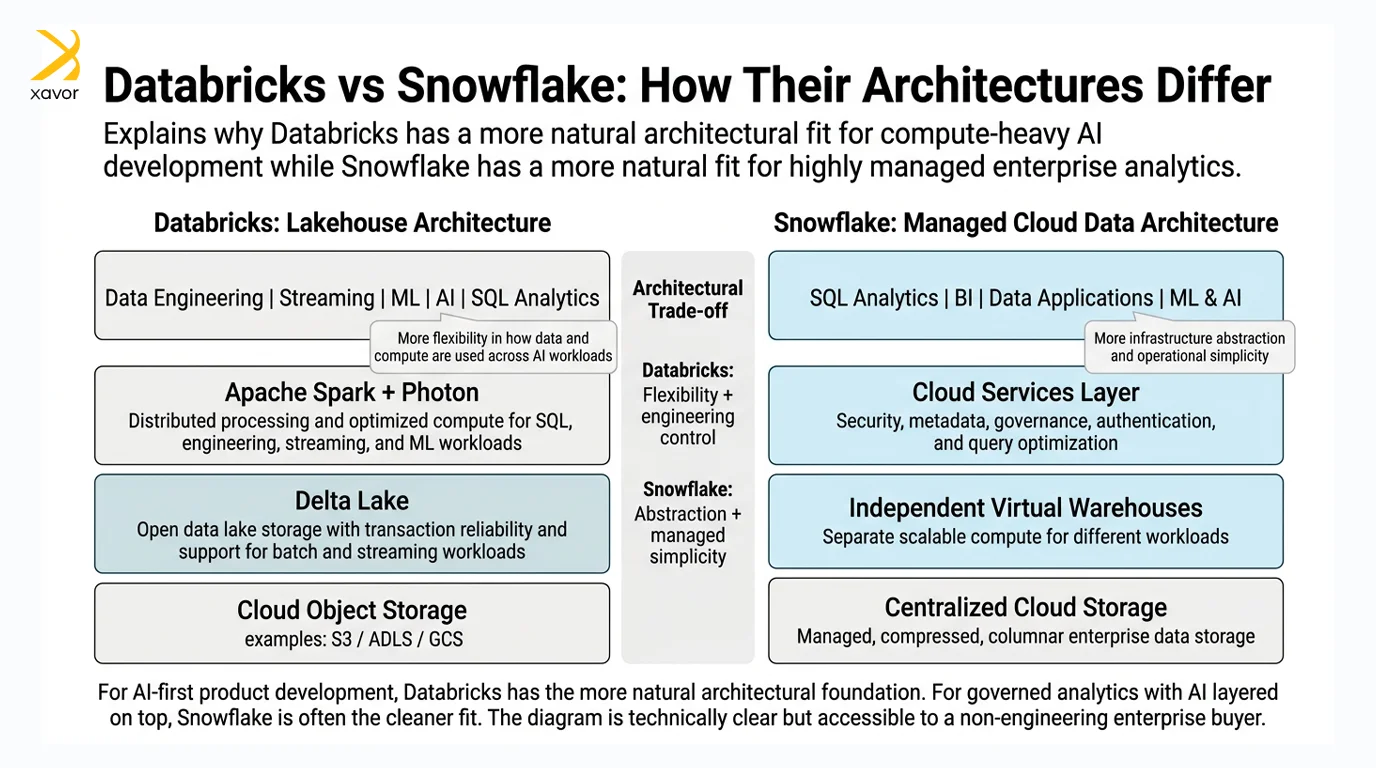
Databricks architecture
Databricks’ architecture is built heavily around Apache Spark and the data lakehouse model. Spark is an open-source processing engine, which gives Databricks the power to support big data workloads. Data lakes provide more flexibility than traditional data warehouses.
Due to the data lakehouse approach, storage and compute are decoupled in Databricks.
- Delta Lake is the storage layer that keeps data in cloud object storage such as S3 but adds database-like reliability through ACID transactions.
- Apache Spark and Photon form the compute layer that speeds up SQL queries and data processing to make large datasets faster to analyze.
There are also other built-in tools for cloud analytics and data science that Databricks’ architecture provides for data engineering.
Snowflake architecture
Snowflake is a managed SaaS platform, and its architecture is fully transparent to the users. It combines two computing architectures: shared disk and shared nothing to create a hybrid architecture.
This fusion allows Snowflake to combine shared centralized storage with independent compute clusters. Users get the simplicity of one data store while still scaling different workloads separately.
Its architecture has three main layers:
- Storage Layer: Snowflake stores data centrally in the cloud. It automatically compresses and organizes the data in a columnar format so it takes less space and can be queried efficiently.
- Compute Layer: Queries are handled by independent Virtual Warehouses, which are separate compute clusters. Because they are isolated from one another, different teams or workloads can run at the same time without competing for the same compute resources.
- Cloud Services Layer: This is the management layer. It handles things like authentication, security, metadata, access control, and query optimization behind the scenes.
Which architecture is better for AI solutions?
Databricks has the stronger architecture for AI. It’s the better of the two data platforms if you want to build actual AI and ML solutions rather than mainly analyzing data with AI.
Snowflake can absolutely support serious AI workloads. Its Model Registry supports common frameworks including PyTorch and TensorFlow. But AI is being layered onto an architecture whose original strength is managed data warehousing. That makes Snowflake especially attractive when the objective is bringing AI to large amounts of governed enterprise data without introducing much infrastructure complexity.
2. Snowflake vs Databricks: Cloud analytics and BI dashboards
Both Databricks and Snowflake can support cloud analytics and BI dashboards. But there is one area where their different origins still matter.
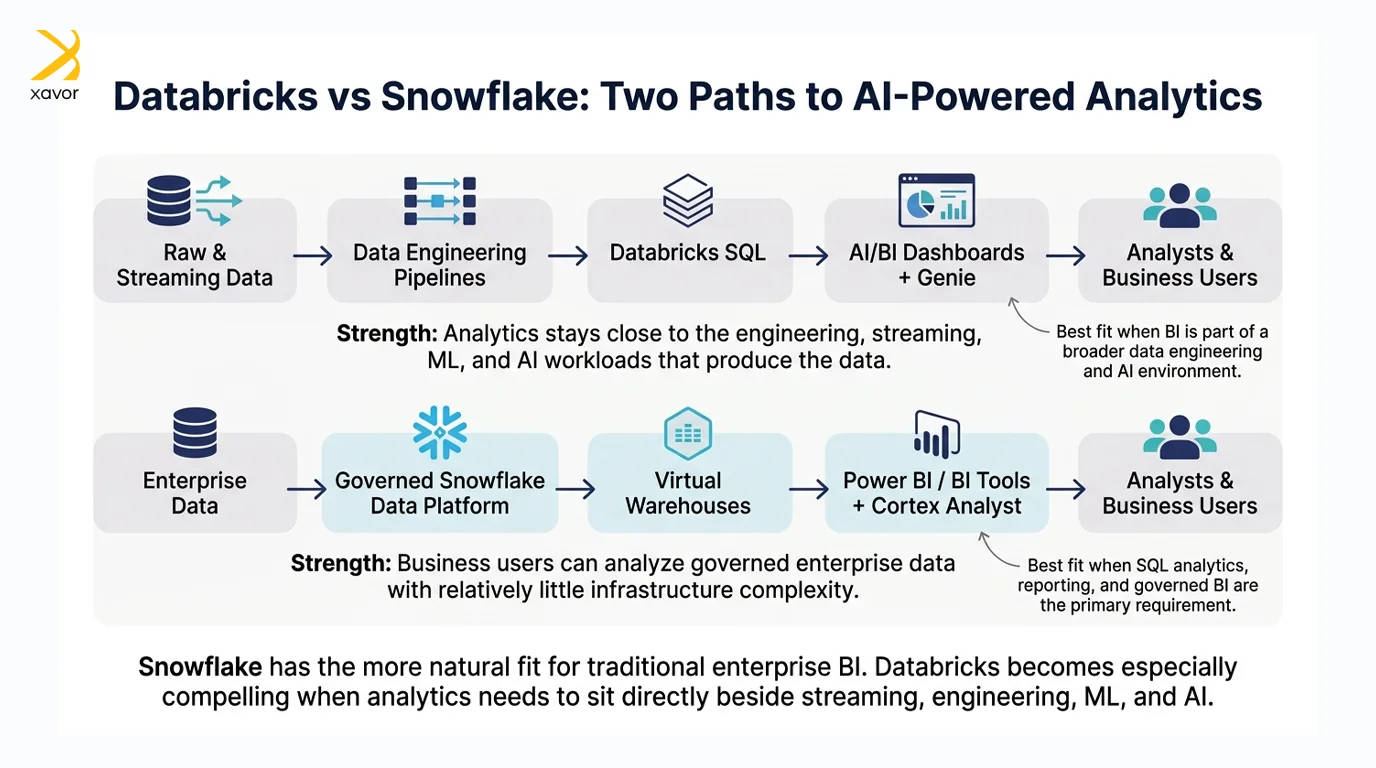
Databricks cloud analytics
Databricks has expanded considerably beyond its data engineering and machine learning roots. Databricks SQL provides SQL warehouses for analytical queries, while AI/BI Dashboards allow teams to build and share dashboards directly inside the platform. Databricks also integrates with established BI tools such as Power BI.
Its AI capabilities are particularly interesting. Genie Agents let business users explore data through natural-language questions, while Unity Catalog semantics can provide consistent metrics and business context across dashboards and AI-driven analysis.
This makes Databricks a strong option when analytics sits alongside data engineering, streaming, machine learning, and AI workloads. The same platform can process the data and then expose it for analysis.
Snowflake cloud analytics
Cloud analytics is much closer to Snowflake’s original purpose. Snowflake was designed as a cloud data warehouse for running SQL analytics across large datasets, and its independent Virtual Warehouses make it relatively simple to separate and scale BI workloads.
It also integrates directly with tools such as Power BI, including enterprise SSO, so organizations can keep Snowflake as the governed data platform while business users work through familiar BI interfaces.
Snowflake is also bringing AI into this analytics model. Semantic Views allow organizations to define business concepts, relationships, and metrics directly over their data. Cortex Analyst can then use those definitions to answer business questions in natural language without requiring the user to write SQL.
Which platform is better for AI solutions?
Snowflake has the edge for AI-related cloud analytics and traditional enterprise BI.
This is its home ground. Snowflake’s SQL-first architecture, managed infrastructure, independent compute warehouses, and close integration with BI tools make it easier for analysts and business teams to query governed data and serve dashboards without dealing with much of the complexity underneath.
Databricks is no longer weak in BI. Its AI/BI Dashboards, SQL Warehouses, semantic capabilities, and Genie Agents make it a serious analytics platform. In fact, if your dashboards are closely tied to streaming data, ML models, data engineering pipelines, or AI-driven exploration, Databricks may be the stronger overall platform.
But if the requirement is more straightforward: centralize enterprise data, run cloud analytics, and serve governed reports and dashboards to business users, Snowflake is the cleaner choice.
3. Snowflake vs Databricks: Cost and scale for big data AI workloads
AI workloads can become expensive quickly. Large datasets, continuous pipelines, model training, GPU inference, and experimentation can all consume significant compute. This is where the amount of control each platform gives you over compute starts to matter.
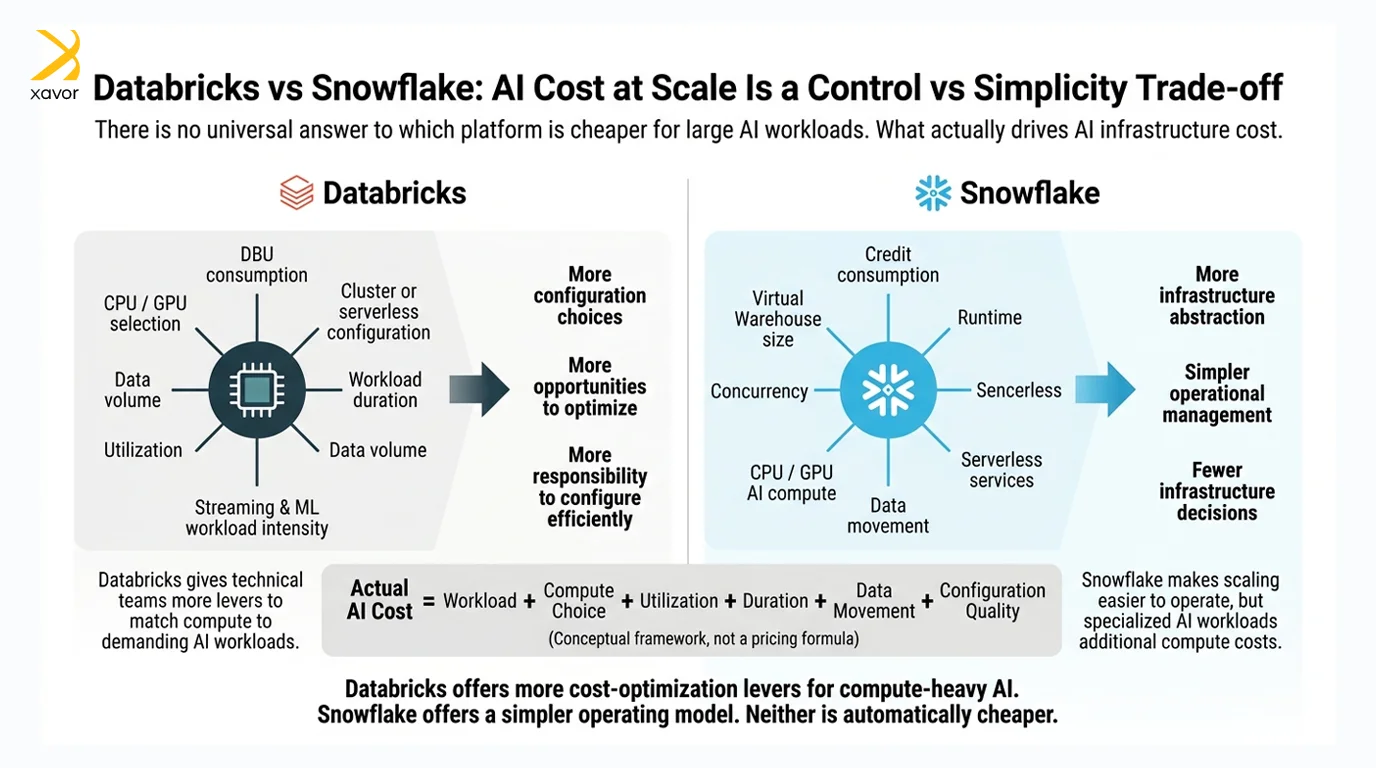
Databricks cost and scalability
Databricks uses a consumption-based pricing model measured largely through Databricks Units, or DBUs. Depending on the workload, organizations can choose between serverless compute and more configurable classic compute. With classic compute, the underlying cloud infrastructure is billed separately, while serverless pricing includes the infrastructure.
The advantage is flexibility. Teams can select different compute configurations for data engineering, SQL, machine learning, and GPU-intensive AI workloads instead of running everything on the same type of infrastructure.
That flexibility gives experienced engineering teams more opportunities to optimize performance and cost at scale. The downside is that more choice also means more room for inefficient configurations. Databricks can be cost-effective for heavy workloads, but it does not automatically make those workloads cheap.
Snowflake cost and scalability
Snowflake also follows a consumption-based model, but compute is primarily charged through Snowflake credits. Virtual Warehouses can be resized, separated by workload, and suspended when they are not being used. Snowflake bills warehouse compute per second after a 60-second minimum when a warehouse starts or resumes.
This makes scaling relatively straightforward. Instead of managing the underlying infrastructure, teams can increase or decrease warehouse capacity and let Snowflake handle the infrastructure behind it.
For more specialized AI workloads, Snowpark Container Services provides separate compute pools with CPU and GPU resources. Snowflake now supports GPU infrastructure for model training, model serving, and other compute-intensive AI workloads, so it is no longer limited to SQL-oriented compute.
But those AI workloads introduce additional cost dimensions. Snowpark Container Services can involve compute pool, storage, and data-transfer charges, with consumption depending on the type and number of nodes running in the compute pool.
Which platform is better for AI solutions?
Databricks has the stronger scaling model for compute-heavy AI workloads, but neither platform is automatically cheaper.
If you are processing huge datasets, training models, running distributed pipelines, or need fine-grained control over CPU and GPU infrastructure, Databricks gives engineering teams more ways to match compute to the workload. That flexibility becomes increasingly valuable as AI workloads grow.
Snowflake wins on operational simplicity. Its managed infrastructure and warehouse model make compute easier to provision, isolate, suspend, and understand. For organizations whose AI workloads largely operate on data already inside Snowflake, that simplicity can outweigh the additional flexibility Databricks provides.
Snowflake vs Databricks is about the workload
The Snowflake vs Databricks decision is not about which platform can claim more AI capabilities. Both can support serious enterprise AI. The real question is where your workloads will spend most of their time.
Databricks has the stronger fit for compute-heavy ML, streaming, and AI engineering, while Snowflake remains the cleaner choice for governed cloud analytics, BI, and teams that prioritize operational simplicity.
Neither platform is automatically cheaper, and the difference increasingly comes down to how you intend to use the compute you are paying for. Before you standardize on either platform, get Xavor’s help choosing and implementing your data platform. We have worked with Snowflake and Databricks across multiple projects for more than a decade, giving us a practical view of where each platform fits and where its trade-offs start to matter.
Contact us at (email protected) to discuss which platform better fits your AI roadmap, data architecture, and expected workloads.
About the Author

Usama is a Principal Software Engineer in the Data Science team at Xavor, specializing in cloud-based data platforms and analytics. He leads scalable data and BI solutions on GCP, with expertise in big data transformation, machine learning, and delivering insight-driven systems for global enterprise clients.
FAQs
Neither is universally better. Snowflake is often simpler for SQL analytics, BI, and managed data warehousing, while Databricks is especially strong for large-scale data engineering, machine learning, and AI workloads.
Yes, Snowflake supports ETL and ELT workflows through native data-loading and transformation capabilities, Snowpark, pipelines, and integrations with third-party ETL tools.
Snowflake is generally easier for teams already comfortable with SQL because much of the platform centers on familiar SQL-based workflows. Databricks can have a steeper learning curve because users may work across SQL, Python, Spark, data engineering, and ML concepts.
Nuoroda į informacijos šaltinį